

How to Switch on Facebook Automatic member Approval. This is a system Facebook made to make things easier for bigger groups and for people who has limited time if it comes to managing groups.
How to Switch on Facebook Automatic member Approval
To set up automatic member approvals:
- Go to “Moderate Group” on your desktop computer
- Click on “Automatically Approve Members”
- Follow the instructions to set up your membership requirements
- You can always return to this screen to edit your membership requirements anytime
You may as well watch this video which will show you step by step
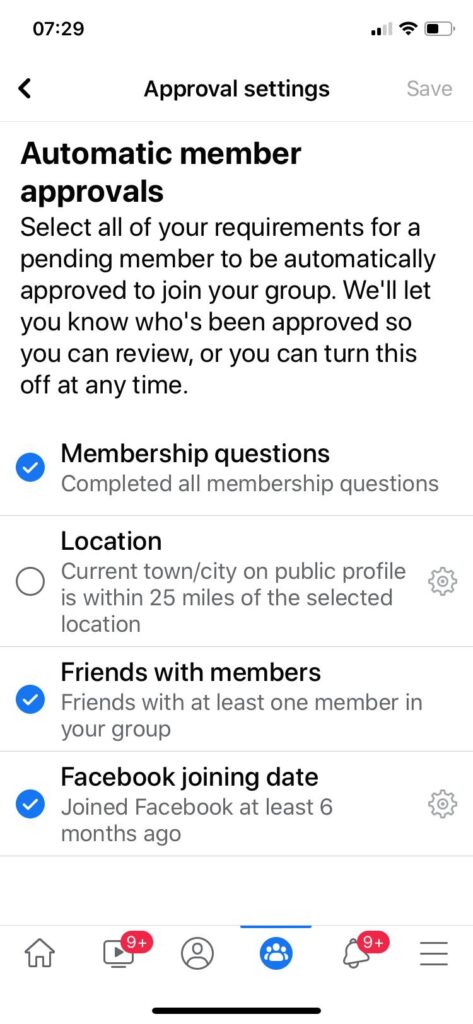
As an admin you can setup requirements before the automation can allow a person to become a member of the group. When you click to setup that you are going to see a message like this
Select all of your requirements for a pending member to be automatically approved to join your group. We’ll let you know who’s been approved so you can review, or you can turn this off at any time.
Admins can require that applicants:
- Live within a specific city or region
- Be approved only if they are friends with people who are current members of the group
- Have been active on Facebook for at least one year or two
Mine I set it to two years and I left other requirements.
Why can’t I approve members to my facebook group?
Group Problem – Can’t Approve Members or Approve Posts
It may be temporarily unavailable, the link you clicked on may have expired, or you may not have permission to view this page.”
How do I approve a pending post on Facebook?Tap Settings then tap Post Approval, then tap to turn on.
You can then choose to either:
- Tap Approve to approve the post.
- Tap Decline to delete the post.
- Tap then Decline post and give feedback to delete the post and provide additional feedback.
How do I see pending posts?Go to the menu at the top right, select ‘Groups’, select the group where you have posted. Then click on the three dotted button on the upper right side, that will show you the pending posts.
How do I edit a scheduled post on Facebook app?To reschedule, edit or delete a scheduled post:
- From your News Feed, tap then tap Groups and select your group.
- Tap in the top right then select Scheduled Posts.
- Next to the post you want to edit, tap then tap Edit Post or Delete.
Read also : How to add and remove a user in Linux ubuntu and Kali

Leave a Reply
You must be logged in to post a comment.